Tempo Timesheet Automation

Automate daily timesheets for 200+ engineers. Zero cost. Zero hosting. Zero manual entry.

200
Engineers
$1.2M
Annual Savings
98%
On-Time Compliance
528
Automated Tests
🖥 Windows 🍎 macOS 🐍 Python 3.7+
Get Started
Problem & Solution

$1.2M Wasted Annually on Manual Timesheets

200 employees spend 15-20 minutes every day on manual timesheet entry. Here's the problem and the fix.

BEFORE - Manual Entry

Daily effort per person 15-20 min
On-time submissions 62%
Manager follow-up/week 2 hours
Employee frustration 6.8 / 10
Accuracy Guesswork from memory
Annual cost $1,215,260

AFTER - Automated

Daily effort per person < 2 min
On-time submissions 98%
Manager follow-up/week < 15 min
Employee frustration 2.0 / 10
Accuracy Automatic from Jira
Annual cost $2,000 maintenance

A Python script runs on each developer's machine. No servers. No hosting. No subscriptions.

1

Read Jira Tickets

Script queries your active tickets (IN DEVELOPMENT / CODE REVIEW) via Jira REST API

2

Distribute Hours

Splits your 8-hour day equally across tickets with smart descriptions from ticket content

3

Submit to Tempo

Creates Jira worklogs (Tempo auto-syncs). At month-end, submits timesheet for approval.

# That's it. Run once and forget.
$ python tempo_automation.py

[OK] Found 3 active tickets
[OK] Logged 2.67h on TS-101
[OK] Logged 2.67h on TS-102
[OK] Logged 2.66h on TS-103
[OK] SYNC COMPLETE - 8.00 / 8 hours
Capabilities

Everything You Need. Nothing You Don't.

Production-ready with 7,268 lines of tested Python code, 528 automated tests, and 22 CLI commands.

🔄

Daily Auto-Sync

Distributes hours equally across active Jira tickets. Runs at your configured time (default 6 PM).

Weekly Verification

Friday check catches missed days. Backfills using historical ticket data via Jira's "status WAS" queries.

📤

Monthly Submission

Verifies total hours and submits timesheet for approval. Blocks on shortfalls. Early submission when remaining days are non-working.

🧮

Smart Distribution

Integer division + remainder on last ticket = exact total every time. Generates descriptions from ticket content.

🔄

Idempotent Sync

Safe to re-run anytime. Deletes previous entries then creates fresh worklogs. No duplicates, no double-counting.

🏗

Overhead Stories

5 cases covered: daily overhead, no tickets, manual entries, PTO/holidays, PI planning week.

📅

Schedule Guard

Skips weekends, org holidays (auto-fetched), national holidays (100+ countries), and PTO days. Override system for comp days.

📊

Tempo as Source of Truth

4 core methods read Tempo API first with Jira fallback. Catches manual Tempo entries that Jira can't see.

Early Submission

Submits timesheet mid-month when all remaining days are non-working. No more waiting for the last day.

🗂

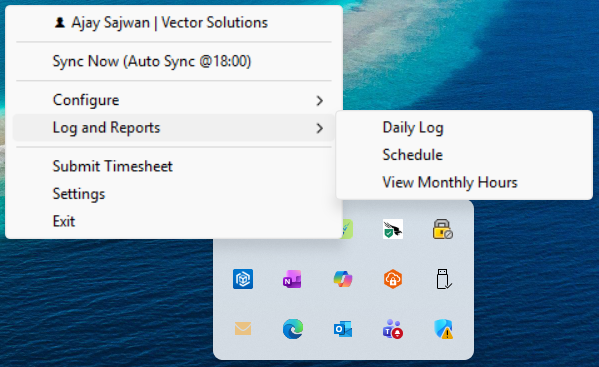
Monthly Reports

--view-monthly shows per-day hours with gap detection. --fix-shortfall interactively fills missing days.

🖥

System Tray App

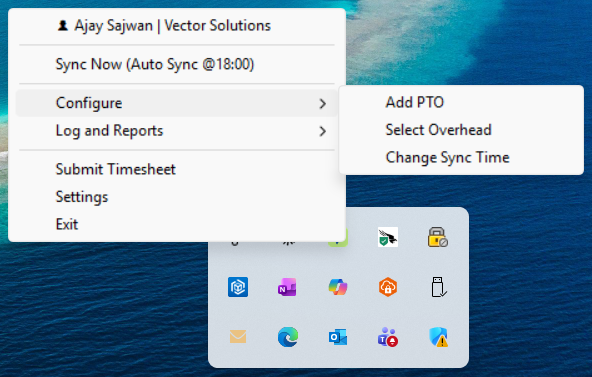
Persistent tray icon with color status, one-click sync, PTO dialog, toast notifications, and smart exit check.

🔔

Toast Notifications

Native notifications on Windows (winotify) and Mac (osascript). Welcome greeting, sync status, shortfall alerts.

👋

Welcome Toast

Personalized "Welcome, {name}!" with time-of-day greeting on launch. "Welcome back" toast when auto-restarted.

🔄

Tray Auto-Restart

Daily scheduler detects if the tray app was closed and relaunches it automatically with a recovery notification.

Change Sync Time

Adjust your daily sync time from the tray Configure menu. Input dialog validates HH:MM and reschedules instantly.

🚪

Smart Exit Check

Verifies today's hours are logged before closing the tray app. Warns if worklogs are missing to prevent gaps.

🌐

Cross-Platform

Full support for Windows 10/11 and macOS. Platform-specific installers, cron jobs, and native UI elements.

📦

Distribution Zips

Three zip types: Windows Full (embedded Python), Windows Lite, and Mac. One-click install for team members.

🔒

DPAPI Encryption

API tokens encrypted with Windows DPAPI (tied to user account). HTTPS for all API calls. No cloud storage.

Setup Wizard

Guided first-run setup: role selection, token entry, location picker (100+ countries), overhead configuration.

💻

Developer

Hours distributed across active Jira tickets (IN DEVELOPMENT / CODE REVIEW). Smart descriptions generated from ticket content.

Tokens neededJira + Tempo
Time saved/day15-20 min
Overhead2h/day default
🧪

QA

Hours distributed across active Jira tickets in Testing / User Acceptance Testing. Same Jira-based workflow as Developer.

Tokens neededJira + Tempo
Time saved/day15-20 min
Overhead2h/day default
📋

Product Owner

Hours logged via configured manual activities in Tempo. No Jira token needed.

Tokens neededTempo only
Time saved/day10-15 min
ActivitiesFrom config
📈

Sales

Pre-configured activities synced via Tempo API. Simplest setup.

Tokens neededTempo only
Time saved/day10-15 min
ActivitiesFrom config
Business Case

The Numbers Speak for Themselves

Immediate ROI with zero infrastructure investment.

Annual Savings
$1.2M
Productivity + management + compliance
ROI
15,091%
$8K investment, $1.2M return
Payback Period
Day 1
Immediate savings from first run
Role Headcount Time Lost/Month Annual Cost
Developers 150 825 hrs $693,000
Product Owners 30 220 hrs $211,200
Sales Team 20 147 hrs $114,660
Manager Follow-ups 15 130 hrs $140,400
Total 215 1,322 hrs $1,159,260
95%

Reduction in manager follow-up time

98%

On-time submission rate (was 62%)

$0

Infrastructure and hosting cost

$6K

Total 5-year investment

Development Activity

21 Days from Idea to Production

Rapid iteration from February 3 to February 23, 2026. 10 releases in 3 weeks.

v1.0
February 3, 2026

Initial Release

Daily sync, Jira/Tempo integration, smart descriptions, idempotent overwrite

v2.0
February 12, 2026

Production Hardening

ASCII-only output, DualWriter, batch wrappers, active daily use

v3.0
February 17, 2026

Schedule Management

Holidays (100+ countries), PTO, weekly verify, monthly submit, 12 new CLI commands

v3.1
February 18, 2026

System Tray App

Tray icon, animated sync, toast notifications, smart exit, auto-start

v3.2
February 19, 2026

Installer & Polish

install.bat rewrite, welcome toast, --stop flag, auto-register

v3.4
February 20, 2026

Overhead Stories

5 overhead cases, PI support, hybrid Jira+Tempo detection

v3.5
February 22, 2026

Mac Support

Full macOS: tray app, install.sh, cron jobs, osascript toasts/dialogs

v3.6
February 22, 2026

Monthly Shortfall

Gap detection, --view-monthly, --fix-shortfall, dynamic tray menu items

v3.8
February 23, 2026

Distribution Zips

build_dist.bat, 3 zip types, embedded Python 3.12, install.bat auto-detect

v3.9
February 23, 2026

Early Submission

Submit mid-month when remaining days are non-working. 385 tests passing.

v4.0
March 13, 2026

Enhancement & QA

Data safety (create-before-delete with rollback), pre-sync health check, retry logic (429/502/503/504), config validation, --dry-run, --backfill, --approval-status, --log-format json, weighted distribution, holiday cache with TTL, parallel worklog creation, 500 tests (71% coverage), CI/CD (GitHub Actions), ruff+pre-commit, keyring credentials (Mac/Linux)

v4.0+
March 24-26, 2026

Accurate Sync & QA Role

Auto-sync fires at configured time with accurate toast (hours logged / reason). Task Scheduler double-sync fix. QA role (Testing / UAT statuses). --dry-run works with --submit.

v4.0.1
March 31, 2026

Tempo API v4 Submit Fix

Correct submit endpoint, reviewer lookup, approval status flow, and response body error logging. 528 tests passing.

Python 3.7+ Jira REST v3 Tempo API v4 528 Tests 7,268 Lines 8 Classes
Usage & Quick Start

See It in Action

Real output from the running application.

Daily Sync Output

Run python tempo_automation.py or python tempo_automation.py --date 2026-02-20

============================================================
TEMPO DAILY SYNC - 2026-02-20 (started 2026-02-20 18:00:05)
============================================================

Found 3 active ticket(s):
  - TS-101: Implement search feature
  - TS-102: Fix login validation
  - TS-103: Update API endpoint

8h / 3 tickets = 2.67h each

  [OK] Logged 2.67h on TS-101
    Description: Implement search feature for the dashboard...
  [OK] Logged 2.67h on TS-102
    Description: Fix login validation for edge cases...
  [OK] Logged 2.66h on TS-103
    Description: Update API endpoint response format...

============================================================
[OK] SYNC COMPLETE (18:00:12)
============================================================
Total entries: 3
Total hours: 8.00 / 8
Status: [OK] Complete

Schedule Calendar

Run python tempo_automation.py --show-schedule

Monthly Hours Report

Run python tempo_automation.py --view-monthly

============================================================
MONTHLY HOURS REPORT - February 2026
============================================================

  Date         Day         Logged Expected     Status
  --------------------------------------------------
  2026-02-02   Monday        8.0h     8.0h       [OK]
  2026-02-03   Tuesday       8.0h     8.0h       [OK]
  2026-02-04   Wednesday     8.0h     8.0h       [OK]
  2026-02-05   Thursday      8.0h     8.0h       [OK]
  2026-02-06   Friday        8.0h     8.0h       [OK]
  2026-02-09   Monday        8.0h     8.0h       [OK]
  2026-02-10   Tuesday       8.0h     8.0h       [OK]
  2026-02-11   Wednesday     8.0h     8.0h       [OK]
  2026-02-12   Thursday      8.0h     8.0h       [OK]
  2026-02-13   Friday        8.0h     8.0h       [OK]
  ...
  --------------------------------------------------
  TOTAL                   120.0h   120.0h

  [OK] All hours accounted for

System Tray App

Right-click the tray icon to access all features. The app lives in your system tray and runs silently in the background.
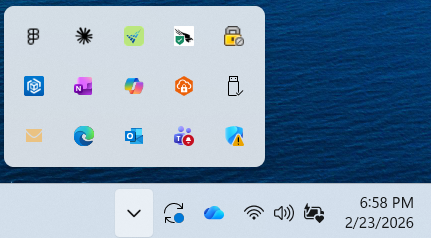
Tray icon colors: Green = idle, Orange = pending/syncing, Red = error

22 CLI Commands

Full command reference: python tempo_automation.py [option]

# Core operations
--date 2026-02-15   # Sync specific date
--verify-week      # Weekly verify & backfill
--submit          # Monthly submit
--setup           # Setup wizard
--manage          # Interactive menu

# Schedule
--show-schedule    # Calendar view
--add-pto         # Add PTO dates
--remove-pto      # Remove PTO dates
# Monthly reports
--view-monthly     # Hours per day report
--fix-shortfall    # Interactive gap fix

# Overhead
--select-overhead  # Pick overhead stories
--show-overhead    # Display overhead config

# Utility
--logfile         # Dual output to file
--quiet           # Suppress console logs

Up and Running in 3 Minutes

Choose your platform. Download. Install. Done.

1

Download

Get the appropriate zip: Windows Full (includes Python), Windows Lite, or Mac

2

Install

Run install.bat (Windows) or ./install.sh (Mac). Follow the setup wizard.

3

Done

Tray app starts automatically. Timesheets are filled every day at 6 PM.

Common Commands

# Daily sync (runs automatically, or manual)
python tempo_automation.py

# Sync a specific date
python tempo_automation.py --date 2026-02-15

# View your schedule calendar
python tempo_automation.py --show-schedule

# Add PTO days before going on leave
python tempo_automation.py --add-pto 2026-03-10,2026-03-11

# View monthly hours report
python tempo_automation.py --view-monthly

# Submit timesheet (auto-runs at month-end)
python tempo_automation.py --submit

Full documentation: SETUP_GUIDE.md

Architecture

Clean, Modular Design

8 classes, single file, no external frameworks. Easy to maintain and extend.

CLI
argparse, 22 commands
TempoAutomation
Orchestration, ~2,100 lines
JiraClient
REST v3, worklogs
TempoClient
API v4, submit
ScheduleManager
Holidays, PTO, calendar
ConfigManager
Setup wizard, config I/O
CredentialManager
DPAPI encryption
NotificationManager
Email, Teams, toast
DualWriter
stdout + file output

API Integration Flow

Jira REST v3
Tickets + Worklogs
Python Script
tempo_automation.py
Tempo API v4
Auto-syncs from Jira

Developers and QA write to Jira; Tempo auto-syncs. PO/Sales write directly to Tempo.

Class Lines Purpose
DualWriter48stdout + file dual output (--logfile)
CredentialManager105DPAPI encrypt/decrypt for Windows
ConfigManager266Config, setup wizard, location picker
ScheduleManager639Holidays, PTO, overrides, calendar
JiraClient367Worklogs CRUD, active issues, JQL, ADF
TempoClient157Worklogs, submit timesheet, periods
NotificationManager247SMTP email, Teams webhook, desktop toast
TempoAutomation2,574Orchestration, sync, verify, backfill, overhead, approval status
Total5,411+ CLI (308 lines, 22 arguments)
Roadmap

What's Next

Shipped in v4.0 and planned enhancements.

🔄 Retry Logic Automatic retry with backoff for 429/502/503/504 API errors. Max 3 retries. v4.0
🔍 --dry-run Mode Preview what would be logged without creating worklogs. Also works with --submit (gap detection runs, no API call made). v4.0
🧪 QA Role Distributes hours across Testing / User Acceptance Testing tickets. Same Jira-based workflow as Developer role. v4.0+
🔔 Accurate Sync Notifications Toast shows actual hours logged or specific reason (no overhead stories, no active tickets, partial). Red icon persists on incomplete sync. v4.0+
Task Scheduler Reliability Eliminates double-sync and missed-sync when Task Scheduler fires. --sync-on-start flag triggers immediate sync if tray was closed at scheduled time. v4.0+
📊 Weighted Distribution Allocate more hours to higher-priority tickets via distribution_weights config. v4.0
📅 Date Range Backfill --backfill --from-date --to-date to fill multiple days at once after vacation. v4.0
🔑 Pre-Sync Health Check Validates Jira + Tempo API connectivity before every sync. Fail fast with clear error. v4.0
📥 Auto-Fill on Submit On last working day, auto-fill gap hours before submitting. No manual --fix-shortfall needed. Next
💬 Teams Webhook MS Teams notifications for sync status and shortfall alerts. Code exists, needs webhook URL. Ready
📦 PyInstaller .exe Bundle into a single executable. No Python install needed at all. Double-click to run. Planned
💬 Slack Notifications Webhook-based Slack alerts for sync status and shortfall warnings. Planned